For any suggestions or feedback regarding these notes,
please contact Pragy Agarwal
Designing Uber
Actors
- Drivers: the ones providing the ride services
- Riders: the customers availing the ride services
Core Feature
Given a Ride Booking Request made by a rider, allocate a nearby driver — find nearest drivers
Other features
- Price calculation
- In reality, Uber has a base-price/km for each ride type that is set by the business people.
- Apart from that Uber takes the ETA into account
- Uses maps API by other providers (Google maps for example)
- Delegates the timing calculation to this maps provider
- Just uses the time estimated by the maps provider and multiplies that with a fixed cost/time
- Surge pricing
- interesting part – this is where Uber gets to rip off their customer
- User’s phone brand
- Map navigation
- Analytics
- Driver onboarding
- Ratings
- Cab tiers
- Payments
- Auth
Q: When I book a ride in Mumbai, should my driver come from London?
No! The driver should come from a nearby place.
- This means that I somehow need to track the driver’s locations
- I need to store these locations in some database
- I need to query these locations
Q: What's the ideal sharding key in Uber (for driver location data)?
When I'm doing this nearest driver query, I need to look at the driver location data.
Country would be too large, state would be too large, city would be good - maybe we can make it more granular..
How to decide the correct granularity?
- We want things to be as large as possible - not too granular
- because if we make a separate quadtree for every 10m2 then we will never find sufficient drivers in our shard
- it has to be sufficiently large
- issue is that different regions have different density
- this was why we wanted a quadtree in the first place
- ideal granularity from the perspective of quadtree will be the entire world!
- because then the quadtree can adjust the grid size based on the regional density perfectly
- We want high enough cardinality
- otherwise, we won't be able to scale horizontally
Just go with city_id
Q: Won’t some cities be much larger than other cities? Won’t this cause a hot shard problem?
Q: If I’m at the edge of a city, and the closest driver is just across the city boundary, then the city_id based sharding will not give me this closest driver.
Q: What about cross-region trips?
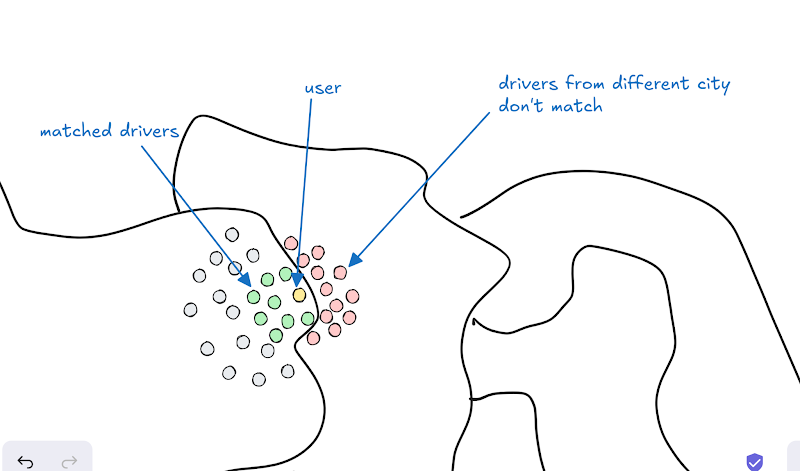
In fact, there are government regulations that Taxi/Commercial drivers registered within the city cannot cross the city boundary.
Uber's entire organisation is actually "multi-tenant" – entire org is sharded by city_id
"outstation rides" in Uber – notice that this is a separate product!
Taxi drivers that operate across cities have to pay tolls everytime they cross region boundaries
Today we will focus on the intra-city (within the city) rides flow.
Sharding the QuadTree
If Uber builds a Quadtree, then it will build a separate QuadTree for each city. Uber will also build "global" quadtrees for each country/state.
Tracking Driver Location
The driver's Uber app (frontend) will periodically ping location updates to the backend.
We will store this location information
- in QuadTree, for finding the nearest driver
- in database, for tracing driver path & other analytics
.png)
Choice of Database
User details
- Data
- Customer (Rider) profile
- Name
- Age
- Gender
- Favorite Locations : Home/Work
- Rating
- Driver profile & compliance
- Name
- Gender
- Cab number plate
- License & Registration
- Color of Cab
- Cab model
- Pets allowed
- Ideal DB:
- What do we need?
- schema? Unstructured data
- joins?
- mostly no
- but sometimes yes, for example, if a user has multiple fav addresses then you can store addresses in a different table if you’re going with SQL. If you’re going with a document db, then the addresses will just be an array inside the document.
- transactions? No
- Analytics? No
- Document Database / SQL
- Sharding Key:
- user_id
Bookings
- Data
- for riders
- for drivers
- Ideal DB:
- schema? (user_id, driver_id, date, type of ride, status, from_location, to_location, rating, payment_id)
- joins? find all past bookings of a rider. find all past services provided by a driver
- transactions? yes, each booking is a ongoing transaction. Also for payments
- SQL
- Sharding Key: user_id
- each booking must be stored in both the rider shard & the driver shard
If we shard by the booking id, then how do we answer the query “given a user, find my recent rides”
If we have 1 billion users, does this mean that we will need 1 billion shards/servers?
No, a single shard/server will house millions of users.
Driver Location data
- Data
- latest location
- historical location
- Ideal DB:
- only latest location – key-value (key=driver_id, value=current location)
- location history – this is timeseries data / sensor readings
- we will need very fast writes
- we will need time based pagination
- we will need aggregate queries (calculate distance, ..)
- Wide Column database (timeseries)
- Sharding Key:
- (user_id) ⇒ wide col database
- Note that the nearest driver queries will not go to this database, they will instead go to the QuadTree (Nearest Driver Service) which will be sharded by
- (city_id) ⇒ quadtree
Booking Request Flow
Q: Should the driver allotment for booking request be sync (respond after finding a driver), or async?
- sync: when the rider makes a booking request, the request to the backend server, the backend allots a driver, and only then, it responds with success to the rider
- in this case, the rider's booking request will time out – because it might take 10 mins to allot a driver – that's too long!
- async: when the rider makes a booking request, the backend server stores the "request" in a db, and returns success to the rider (along with the booking id). Then in the background, it allots a driver
- this is similar to a video processing website
- you submit a task (video processing / allot driver / …)
- you get a task id
- then you periodically-check/get-notified if the task status has changed
Request flow:
- Rider makes a booking request – this goes to the Booking microservice
- Booking microservice stores this request in the booking database, and returns the booking_id to the rider
bookings
id rider_id driver_id source destination cab_type created_at payment_mode status
5 durga pragy mumbai pune XL 10.44pm upi driver-arriving - (async) it adds a task in the message queue
- Driver Allotment microservice picks this task
- Find k nearby drivers via the Nearest driver microservice
- Notify drivers to about this request via the Notifications microservice
- Once driver accepts, it will update the status in the Bookings database
- Notify the rider about the status via the Notifications service
.png)
Q: Should we ping all nearby drivers one by one (serially), or all at once (in parallel)?
Nearest driver microservice returns k nearby drivers. Should be ping them all at once, or one by one?
- Ping all drivers at once
- Send out the booking request to all nearby drivers in parallel. Fastest-finger-first – the first driver to accept the booking wins – they get allotted the booking
- Rider experience:
- low latency for driver allotment, because we're reaching out to all nearby drivers in parallel
- Driver experience:
- extremely bad! Drivers complain that you say this ride is available, I click accept, then you say ride no longer available
- because all drivers will try to click "accept" at the same time – but only 1 will win
- for all other drivers, they're being fooled
- Note that multiple drivers accepting at the same time is NOT a reason for poor driver experience, since the SQL schema & transaction will ensure that only 1 driver can be allotted to any booking
driver accepts
update bookings set driver_id = [pragy] where id = [booking_id] and driver_id = null
- Ping one by one
- Send out the booking request to the nearest driver (or some other way of ranking/rating/random ranking). Wait for a fixed time (say 10 seconds) for them to either Accept the request. If request gets Rejected/Timedout, move to the next nearest driver. If the driver accepts, we will update the booking status in the database, and stop
- Rider experience:
- high latency for finding drivers – mostly this is a necessary evil, because we need to balance both rider & driver experience
- it's also okay, because usually the time it will take for the driver to actually arrive will far exceed the allotment latency – provided there's sufficient number of drivers (bootstrapping problem)
- Driver experience:
- much more reasonable
- driver gets a sufficient amount of time to respond to the request
Uber is a 2 sided marketplace – you have to please both the riders and the drivers.
Updating the Quad Tree
Scale Estimation
Scale of Uber (as of 2025)
- operates across 13,000+ cities globally
- 8+ million drivers
- 30+ million completed trips per day
≈ 500 trips / s completed trips per second
# location updates / second (writes)
Let us assume that each driver works an average of 12 hours a day, and send location updates every 10 seconds.
#location updates / second
= (8 million driver) * (12 hours / day / driver) * (1 update / 10 seconds)
≈ 400,000 updates / second
A cluster of column family db servers will be able to handle 400,000 writes/second. But this cluster will be expensive.
A single QuadTree server will most likely not be able to handle 400,000 writes per second.
Hence, we need to optimize the location updates.
# nearest driver queries / second (reads)
Let us assume that each completed trip requires 3 booking attempts on average. Each booking attempt requires the nearest driver API to be called once.
.png)
# nearest driver queries / second
= (30 million trips / day) * (3 queries / trip)
≈ 100 million queries / day
≈ 1,000 queries / second
Presently, the Quadtree writes are 400x more than the Quadtree reads! It's a write-heavy system.
To optimize write-heavy systems
- optimize db for writes (we've already done that – wide-col database, in-memory quadtree)
- reduce the # of writes if you can
- batching (write-back cache – potential data loss) (without write-back cache – eventual consistency)
- sampling (guaranteed data loss)
- domain specific reduction logic
Optimizing QuadTree Updates
Q: If the driver is not moving / stuck in traffic, should they send location updates every 10 seconds?
No.
We should send location updates only if the location has changed by at least a distance D = 100m.
This will reduce the number of updates to both the wide-col database, and the quadtree.
As a fallback, if the location hasn’t changed significantly, still, send an update but a lower frequency (say once every 2 mins)
Kathan’s logic: send location update every 100m or every 1 min whichever is earlier – this logic will automatically send updates more frequently when the driver is at high speed, and fallback to slow speed when the driver is stuck/not moving.
Q: If the driver is not available, should they send location updates?
- on a break
- don't send location updates at all
- This will optimize the number of updates in both DB and quadtree.
- already in a ride
- if they're already in a ride, they're not available for booking
- unless, they're close to the destination – in which case, you want to make them available again (your driver is completing a ride nearby)
- send location updates only to the wide-col database
- because we want to keep track of the ride's route
- not to the quadtree (because they should not be available for the nearest driver query)
- This will optimize the number of updates in the quadtree.
Q: If the driver hasn't crossed the node boundary, is there any point in updating the quadtree?
.png)
- Update location in Database – so that we can track the driver location *perform always
- Update location in QuadTree
- Only perform when the driver has crossed the node boundary
- After update, quadtree will return the new node boundary
- then the app server can check whether the new location is within the node boundary or not
not (node.left <= x <= node.right && node.top <= y <= node.bottom)
.png)
driver_id ⇒ node boundary
8b 8b + 8b + 8b + 8b
40b / driver
8 million drivers
320 million bytes
320 MB ⇒ easily fits in the RAM.
Since the drivers will drive within the node boundary most of the time, this significantly reduces the number of updates to the quadtree.
Quadtree Location-Updates vs Grid-Density/Structure-Updates
.png)
When a driver crosses a node boundary, perform the following
- Location Updates – move the driver into the other node *perform always
- location updates are needed so that we can find the drivers within the cell for the nearest driver query
- Grid Updates – doesn't need to be performed always
- Whenever the grid structure changes — this invalidates the node-boundary cache that we have in the app server for all the drivers in the changed nodes.
- grid updates are needed so that the grid can react to the changes in the density of various regions
- Cron Job (batching): update the grid structure every 5 mins
This is much better than doing it 400,000 times per second (for every update that comes to the quadtree) - Soft Threshold: instead of having a hard split threshold like 10, make it a soft value
- split when #drivers in node exceed 15
- merge when #drivers in node fall below 5
.png)
.png)
(optional) Does Uber actually use QuadTrees?
No 😛
Uber primarily uses a H3 Hexagonal Hierarchical Spatial Index rather than Quadtree or Geohash for geospatial indexing.
Why Not Quadtree?
- Quadtree-based spatial indexing recursively divides a 2D plane into 4 quadrants. This has some drawbacks:
- Inefficient for load balancing: Popular city areas (like downtown) would require a deeper quadtree structure due to high density, making lookups slower.
- Fragmentation issues: Unevenly sized cells mean some areas get very small cells, while others remain large, leading to inefficiencies in searching.
- Edge problems: When a driver and rider are near a cell boundary, additional computations are needed to query neighboring cells.
Why Not Geohash?
- Geohash divides the world into rectangular grids and represents them as a string. This too has some drawbacks:
- Rectangular distortion: Geohash grids vary in size based on latitude due to Earth's curvature, leading to inconsistent spatial resolution.
- Neighbor lookup inefficiency: Finding adjacent regions (drivers near cell boundaries) requires additional computation, as Geohash does not have an intrinsic neighborhood structure.
- Poor hierarchical properties: Geohash does not support multi-resolution indexing as efficiently as Uber’s H3.
H3 Hexagonal Hierarchical Spatial Index
Uber developed H3, a hexagonal hierarchical spatial index, to overcome these limitations:
- Hexagonal cells: Provide better spatial uniformity compared to rectangles in Geohash.
- Hierarchical indexing: Each hexagonal cell can be subdivided into smaller hexagons, making multi-resolution queries efficient.
- Neighboring lookup efficiency: Hexagons have six equidistant neighbors, reducing complexity in nearest-driver searches.
- Better load balancing: Hexagons provide a more even distribution of spatial data, avoiding fragmentation issues seen in Quadtrees.
- Scalability: H3 allows Uber to efficiently group drivers into hexagonal regions and dynamically adjust search radii based on demand.
.png)
.png)
How Uber Finds the Nearest Driver?
- Convert driver & rider coordinates to H3 indices at a suitable resolution.
- Lookup drivers within the same hexagon (fast query).
- Expand search to neighboring hexagons if necessary.
- Compute actual distance using Haversine or road network data to refine results.